

Description
Download Visual Business Cards – create business cards, business card maker, business card design, mobile app for business cards, visual business cards
Overview
Visual Business Cards is a mobile application designed to streamline the creation of professional business cards directly from a smartphone. The app targets individuals and small business owners who need to produce high-quality, personalized cards without relying on external designers or complex design software. By offering a simplified, step-by-step approach, it addresses the common challenges of time constraints, design inexperience, and budget limitations. The app’s core purpose is to democratize access to professional branding tools, enabling users to craft visually appealing business cards in minutes.
It serves as a practical utility for freelancers, entrepreneurs, and professionals attending networking events who require quick, on-the-go branding solutions. The app’s focus on usability and speed makes it especially valuable in fast-paced environments where immediate access to a professional card is essential. While the developer did not provide additional technical details, the app’s long-standing presence since its release on October 16, 2008, suggests a stable and reliable user base. Its continued relevance in the productivity category highlights its importance as a lightweight, accessible tool within the mobile ecosystem.
Although the developer did not list formal performance metrics or compatibility specifications, the app’s minimal file size of 2.4M indicates an optimized footprint, likely suitable for a wide range of Android devices. Its free pricing model further enhances accessibility, making it an attractive option for users seeking no-cost solutions to a common professional need.
Key Features & Functionality
- User-Friendly Interface: The app features an intuitive layout designed for minimal learning curve. Even users with no prior design experience can navigate the app with ease, thanks to clear visual cues and straightforward menus.
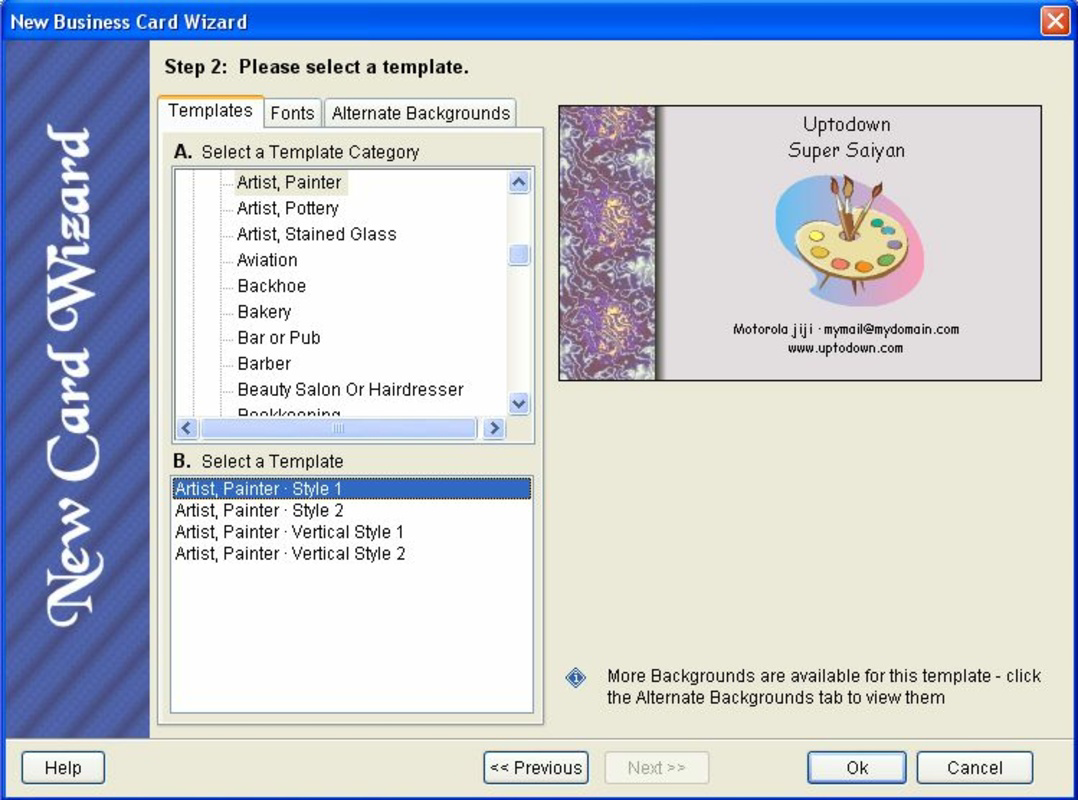
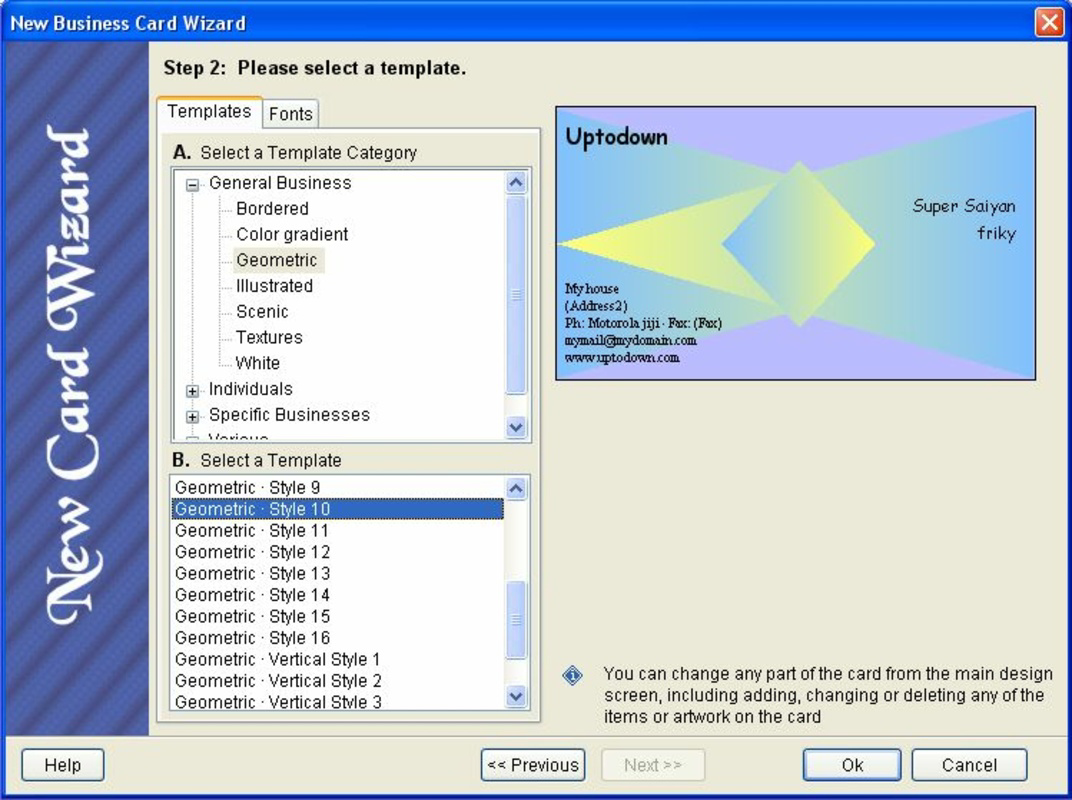
- WYSIWYG Design System: What You See Is What You Get functionality allows real-time previews of the business card. Users can adjust text, colors, and layout elements and immediately view the final output, reducing the need for guesswork.
- Cost-Effective Design Solution: By eliminating the need for professional graphic designers, the app helps users save money while still producing polished, brand-consistent cards.
- Quick Design Process: With pre-designed templates and drag-and-drop customization tools, users can create a complete business card in under five minutes.
- No Design Skills Required: The app abstracts complex design principles into simple, guided steps, allowing anyone to produce a visually balanced and professional card.
For example, a freelance photographer can use the app to create a card with their name, contact details, and a portfolio link in minutes, using a template that matches their creative style. Similarly, a small business owner launching a new service can update their card with new information and distribute it instantly at a local market. The app’s functionality is optimized for real-world use, where speed, simplicity, and professionalism are critical.
Interface, UX & Performance
The user interface of Visual Business Cards emphasizes clarity and efficiency. The layout follows a linear workflow, guiding users through selection, customization, and export stages without unnecessary distractions. Visual elements are minimal but purposeful, ensuring that the focus remains on the design canvas. Navigation is consistent across screens, with intuitive buttons and clear labels, reducing cognitive load.
Although the developer did not list formal performance metrics, the app’s lightweight size of 2.4M suggests optimized resource usage, likely resulting in smooth operation on mid-range and older Android devices. The app appears responsive during design interactions, with minimal lag when adjusting text or applying templates. Stability is implied by its long-standing availability, though no crash reports or update frequency details were provided.
Users can expect a stable experience during the design process, with consistent rendering of elements across different screen sizes. However, specific requirements for device compatibility were not fully disclosed, so users should ensure their device meets general Android standards. Overall, the app delivers a reliable, frictionless experience focused on its core function: creating business cards quickly and efficiently.
Platform Compatibility & Technical Requirements
Visual Business Cards is available exclusively on the Android platform. The current version is 1.0.1, with a file size of 2.4M, indicating a lightweight application suitable for devices with limited storage. The app is currently offered at no cost, making it accessible to a broad audience.
The developer did not specify minimum OS requirements or device compatibility details. As such, users should verify whether their Android device meets the app’s runtime needs. While the app has been available since 2008, it may not support the latest Android versions without updates. Compatibility information was not fully disclosed, so installation should be approached with caution on newer devices.
Pros and Cons
Pros
- Free to download and use, eliminating upfront costs
- Minimal file size, ideal for low-storage devices
- Intuitive interface suitable for users with no design experience
- Real-time WYSIWYG preview enhances design accuracy
- Fast creation process with pre-designed templates
Cons
- Developer did not provide detailed system requirements
- Compatibility with modern Android versions is uncertain
- No information on update frequency or future development
- Limited customization options may not suit advanced users
- No cloud sync or export formats beyond basic image
FAQ
Is Visual Business Cards safe to download?
Yes, the app is available through official Android channels and has been in use since 2008. However, users should ensure they download from trusted sources to maintain security.
Can I use Visual Business Cards on iOS devices?
Currently, the app is only available for Android. There is no official iOS version listed.
How often is the app updated?
The developer did not disclose update frequency. Users should monitor the app store for new versions.
What file formats are available for exported cards?
Export options are not specified. Typically, such apps generate image files like PNG or JPEG.
Is my data stored on the device or in the cloud?
The developer did not provide information on data storage. It is recommended to assume local storage unless otherwise stated.
Final Thoughts
Visual Business Cards remains a practical, no-frills tool for creating professional business cards on Android. Its simplicity, affordability, and focus on speed make it ideal for users who prioritize functionality over advanced features. While the app lacks modern enhancements like cloud integration or multi-format export, its core purpose is fulfilled with precision. For freelancers, small business owners, and networking professionals, it offers a reliable way to maintain a consistent personal brand without design expertise or financial investment.
Despite limited technical details and uncertain compatibility with newer devices, the app’s enduring presence speaks to its effectiveness. Its minimal footprint and free access ensure broad reach across diverse user groups. If you need a straightforward way to create and share business cards from your smartphone, Visual Business Cards delivers a solid solution.
Download Visual Business Cards now
Guides & Tutorials for Visual Business Cards
How to install Visual Business Cards
- Click the Preview / Download button above.
- Once redirected, accept the terms and click Install.
- Wait for the Visual Business Cards download to finish on your device.
How to use Visual Business Cards
This software is primarily used for its core features described above. Open the app after installation to explore its capabilities.
User Reviews for Visual Business Cards 0
No reviews found


